
How to Create a Database in cPanel
1. Log in to your cPanel account.
2. In the Databases section, click on MySQL Databases.

3. In the New Database field, enter a name for the new database you wish to create.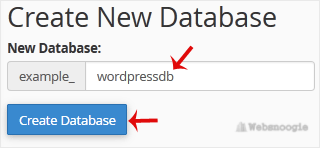
4. Click on Create Database.
1. Log in to your cPanel account.
2. In the Databases section, click on MySQL Databases.
3. In the New Database field, enter a name for the new database you wish to create.
4. Click on Create Database.